


Double click image to zoom in
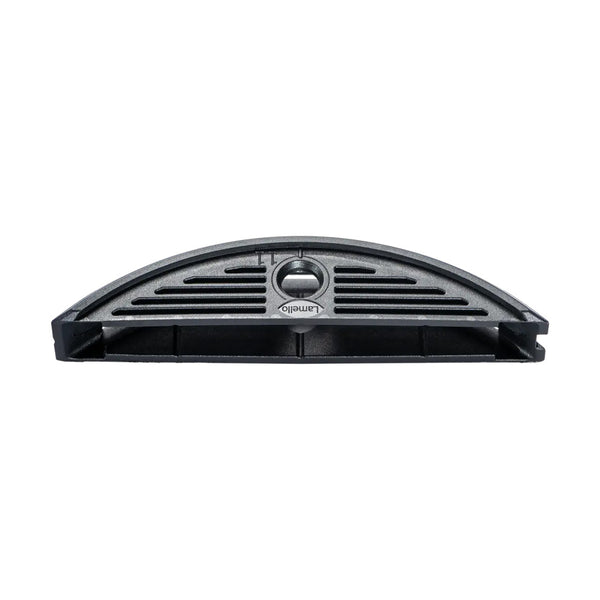


Click image to open expanded view
Stay up to date on the latest sales, learn about new products and receive a promo code for 10% off your first order* when you sign up for emails.
*Excludes machinery & select brands. Click here for more details.


Have questions? Give us a call at 260-637-0054.
For use with Zeta P2 Handheld Joiners or CNC Router with P-System tooling.
At a Glance:
The Details:
The LC P-16 is a specialized Lamello P-System connector for lightweight panels such as cardboard & plastic honeycomb, MDF, and hard foam. The main advantage of the LC P-16 is that it eliminates the need for concealed edges. Designed for builders, fabricators, and interior specialists, the LC P-16 combines the advantages of lightweight construction with the efficient and aesthetic Clamex joint.
The LC P-16 acts as a receiver for Clamex P-14 connector halves, creating durable joints in lightweight panels. Using a Zeta P2 joiner with an 18mm depth setting and 2mm adjuster cap (sold separately), grooves can be cut directly into honeycomb materials. For precision, the Clamex P drill jig with interchangeable P-16 insert ensures perfect alignment, while a CNC with P-System capability can also be used.
Once installed, the LC P-16 allows you to connect panels just like any other Clamex P connector. The results are strong, clean joints that look professional and hold up under demanding use.
The LC P-16x11 is suitable for material with a minimum edge thickness of 12mm. Also available as P-16x17 (minimum 22mm) and P-16x22 (minimum 27mm). An LC P-16 Starter Set that includes all necessary connectors and accessories is also available.
Installation Instructions
These instructions are for the Zeta P2. Can also be done with a CNC. It's always best to confirm with your CNC's manufacturer to determine what all you need for making the P-System groove.
Tip: Use Lamello's LC P-16 Configurator to determine what size connector to use and which Zeta P2 cutting positions are ideal.
Installation Tolerance: Longitudinal ± 1mm
Installation Tolerance: Radial ± 1mm
Min. Material Thickness for Surface Cuts: 12mm
Min. Material Thickness for Edge Cuts: 16mm
Min. Material Thickness for Center Panel: 19mm
Min. Workpiece Width: 73.5mm
OakTree Supply is a family owned and operated woodworking machinery, tool and supply store with a focus on quality brands you won't find in the big-box stores. Whether you are a hobbyist, a long-time pro, or even a business in need of industrial machinery, we can help!
Learn more on our About Us page.
Visit Our Retail Store:
14110 Plank Street
Fort Wayne, IN 46818
Stay in the loop about sales, new products, events, helpful information & more!
© 2026, OakTree Supply Powered by Shopify